










Specifications
![[PDF] Click to Download Printable Version](images/spec_btn_01.gif)
| Model | LT-42WX70EU | |
|---|---|---|
| Area | Continental Europe and UK | |
| Appearance and Design | ||
| Picture Size | Full HD (1920 x 1080), 107cm | |
| Contrast Ratio | 4,000:1 (Native); 50,000:1 (Dynamic) |
|
| Brightness (cd/m2) | 450 | |
| Response Rate (ms) | 6.5 | |
| Viewing Angle (Vertical / Horizontal) | 178 / 178 | |
| Device | Wide LCD | |
| Picture | ||
| HD Compatibility | 1080p/24Hz, 1080p (1125p) 50/60Hz, 1080i (1125i) 50/60Hz, 720p (750p) 50/60Hz | |
| 100Hz Clear Motion Drive | 100Hz/120Hz Clear Motion Drive IIl | |
| DynaPix Picture Engine | New DynaPix HD | |
| Real Bit Driver |  (12-bit x RGB =36bit) (12-bit x RGB =36bit) |
|
| Deep Colour / x.v.Colour | / |
|
| Adobe RGB (for HD Photo) | 96% coverage | |
| Intelligent Colour Management | |
|
| Y/C Separation | (3D Y/C) |
|
| Movie Theatre (2-2/2-3 pull-down) | |
|
| Intelligent Clear NR | (Motion-estimate Hadamard 3D NR) |
|
| Noise Reduction (N/R) | (Digital NR / MPEG NR) |
|
| White Balance (Colour Temperature) | |
|
| Black Level Correction | |
|
| Picture and Text Dual Screen | |
|
| Auto Aspect Switching | (Auto WSS) |
|
| Aspect Mode | |
|
| Picture Mode | |
|
| Sound | ||
| Power Output (RMS) | 20W total (10W + 10W) | |
| Number of Speakers | 2 (Removable Pole-Speakers x 1pc) | |
| Terminals | ||
| Input | HDMI | x3 (CEC) |
| Component | x1 (shared with PC IN*) | |
| Composite | x1 (shared with PC IN*) | |
| PC (D-sub 15-pin) | x1 (with 3.5mm audio mini jack) | |
| Others | ||
| Bitmap Graphical Menu | |
|
| OSD Languages | English, German, French, Italian, Spanish, Portuguese, Dutch, Swedish, Danish, Finnish, Norwegian, Czech, Polish, Hungarian, Bulgarian, Russian, Greek, Ukrainian, Catalan, Turkish, Romanian | |
| Touch Sensor Panel Operation | |
|
| Eco Mode | |
|
| Remote Control Unit | |
|
| Table-top Stand | (Swivel / 3-step height) |
|
| General | ||
| Power Requirements | 100-240V AC, 50Hz/60Hz | |
| Power Consumption: Avg / Standby | 175W / 0.7W | |
| Dimensions: W x H x D, mm | ||
| With stand (high) | 990 x 716.8 x 170 | |
| With stand (mid) | 990 x 689.3 x 170 | |
| With stand (low) | 990 x 661.8 x 170 | |
| Without stand | 990 x 599.7 x 42.5 | |
| Weight: kg | ||
| With stand | 19.0 (w/o SPK: 17.8) | |
| Without stand | 13.2 (w/o SPK: 12.0) | |
*Compatible with supplied D-sub 15-pin to RCA-pin conversion cable
**Compatible with supplied RCA-pin to SCART conversion cable
E. & O.E. Design and specifications subject to change without notice.
All TV screen pictures are simulated.
Adobe, and the Adobe logo are either registered trademarks or trademarks of Adobe Systems Incorporated in the United States and/or other countries.
x.v.Colour and x.v.Colour logo are registered trademarks or trademarks of Sony Corporation.
HDMI, the HDMI logo and High-Definition Multimedia Interface are trademarks or registered trademarks of HDMI Licensing LLC.
All other brand or product names may be trademarks and or registered trademarks of their respective owners.
Any rights not expressly granted herein are reserved.
Copyright © 2009, Victor Company of Japan, Limited (JVC). All Rights Reserved.

Enhanced Connectivity
The LT-42WX70 comes with an array of terminals to enhance connectivity such as three HDMI connectors (CEC), a PC input terminal that can be used as a component or composite terminal via the supplied conversion cable, and audio L/R jacks for the supplied speaker or connection to an external speaker system.
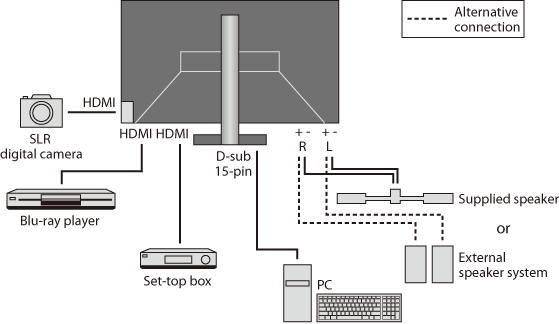
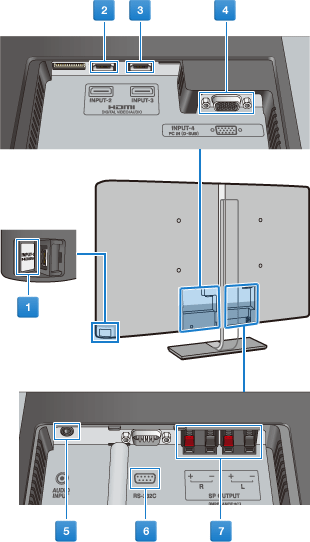
Terminals on the LT-42WX70
Supplied cables: Video (x1) and Audio (x1) cables
HDMI, component, DVI-HDMI, VGA, and other video and audio cables must be purchased separately.
 INPUT-1: HDMI terminal
-
- Connect to a DVI device using a DVI-HDMI cable
- Connect to an HDMI device using an HDMI cable
 INPUT-2: HDMI terminal
-
- Connect to an HDMI device using an HDMI cable
 INPUT-3: HDMI terminal
-
- Connect to an HDMI device using an HDMI cable
 INPUT-4: D-sub 15-pin
-
- Connect to a device with component terminals by connecting the supplied video cable with a component cable
- Connect to a device with composite terminals by connecting the supplied video cable (use green jack only) with a video cable.
- Connect to a PC using a VGA cable
 AUDIO INPUT
-
- Connect to a device with component or composite terminal, or a DVI device by connecting the supplied audio cable with an audio cable
- Connect to a PC using an audio cable
 RS-232C
-
- Used to control the monitor from a computer; contact qualified technician for setup details.
 SPEAKER OUTPUT
-
- For a connection with external speakers
NOTE:
- Set INPUT-4 properly in accordance with the connected device before using the terminal.
- Use a VGA cable with core filters to reduce noise.
- Connecting a DVI device into INPUT-2 or INPUT-3 will playback only the video signals; sound will playback via AUDIO INPUT.