








New Colour Management System with 7-axis matrix (DLA-X9/DLA-X7)
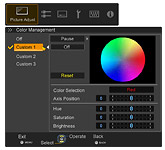
In addition to the ordinary 6-axis matrix of red, green, blue, cyan, magenta, and yellow, the new Colour Management System features a seventh matrix of orange to ensure the precise adjustment of hue, saturation, and intensity. The addition of the orange axis also helps in enhancing the selection of the colour spectrum for skin tones. And for improved operability, only the colour being adjusted will be shown on the screen in its actual hue while the others are displayed in black and white.
GUI

The actual hue of only the colour being adjusted is shown; others are displayed in black and white.
JVC original Film Tone function (DLA-X9/DLA-X7)
Until now, attempting to correct brightness or contrast settings as desired caused black or white levels to shift incorrectly with each setting. In order to overcome this issue, JVC has developed an original Film Tone function, which works to balance gamma, contrast, and brightness settings without affecting the grey scaling of the source to enable brightness adjustment that better matches the ambient environment.
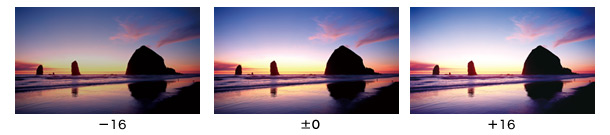
*Simulated pictures to emphasise the difference between Film Tone and Conventional
New Screen Adjustment Modes (DLA-X9/DLA-X7)
JVC has focused on individual screen characteristics to ensure the faithful reproduction of film-like picture quality. By improving upon the screen correction modes found on Conventional models, these New Screen Adjustment Modes analyse the RGB reflective characteristics of the screen being used to achieve precise correction. The user can also select an optimal parameter from a set of 94 parameters to create an outstanding picture with natural colour balance.
*Please refer to the JVC website for the New Screen Adjustment Mode table of primary screens and adjustment modes.
New Screen Adjustment Mode off.


*Simulated picture to demonstrate picture enhancement.
Screen Adjustment Modes(DLA-X3)
The DLA-X3 is equipped with three Screen Adjustment Modes that enable users to select the optimum mode to match individual screen characteristics for more natural and balanced colour reproduction.
*Please refer to the JVC website for the Screen Adjustment Mode table of primary screens and adjustment modes.
Screen Adjustment Mode off.


*Simulated picture to demonstrate picture enhancement.
Darkness and lightness correction
Adjustment of grey level, another essential factor for creating high-quality images, can be corrected by separating darkness and lightness levels. By enabling darkness and lightness correction, the desired levels of gradation can be achieved without the tedious gamma correction process of Conventional models.
Black Level setting
The Black Level setting function ensures ideal levels of gradation that match the viewing environment. To facilitate adjustment of black level gradation in areas such as the living room where ambient light levels can be bright, this function displays a test pattern on the screen to allow easy confirmation and setting of black levels to ensure the best picture in all viewing conditions.
Customised gamma control
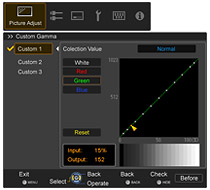
Manual adjustment of gamma curve is possible via an on-screen display, allowing the viewer to adjust projector luminance levels by either increasing contrast in scenes that are too dark or dimming washed-out scenes to ensure precise brightness levels suited to individual preferences. Up to three settings can be adjusted and stored for future use.